



![图片[1]- 子比主题首页时间代码分享](https://www.dh139.cn/wp-content/uploads/2026/01/1-1.jpg)
<!-- 时间天气组件(精简版) -->
<div class="sidebar-time-widget">
  <div class="time-display">15:35:28</div>
  <div class="date-info">加载中...</div>
  <div class="weather-info"><span>⏳</span>正在获取天气...</div>
</div>

<style>
/* 根背景适配(替换为你的实际背景图URL) */
html { background: url("你的背景图URL") no-repeat center/cover; min-height: 100vh; }

.sidebar-time-widget {
  background: transparent;
  mix-blend-mode: difference; /* 自动适配背景颜色 */
  color: #fff;
  padding: 15px;
  border-radius: 8px;
  text-align: center;
  text-shadow: 0 0 2px rgba(0,0,0,0.5); /* 增强可读性 */
}
.time-display { font: bold 42px/1.2 sans-serif; margin: 10px 0; }
.date-info, .weather-info { font: bold 14px/1.2 sans-serif; margin: 5px 0; }
.weather-info span { margin-right: 5px; }
</style>

<script>
// 工具函数:补零
const padZero = n => n.toString().padStart(2, '0');

// 时间/日期更新(合并逻辑)
function updateDateTime() {
  const now = new Date();
  // 更新时间
  document.querySelector('.time-display').textContent =
    `${padZero(now.getHours())}:${padZero(now.getMinutes())}:${padZero(now.getSeconds())}`;

  // 更新日期(含农历)
  const weekDays = ['星期日','星期一','星期二','星期三','星期四','星期五','星期六'];
  const lunarMonths = ['正月','二月','三月','四月','五月','六月','七月','八月','九月','十月','冬月','腊月'];
  const lunarDay = now.getDate() <=10 ? '初十' : now.getDate() <=20 ? '二十' : now.getDate() <=30 ? '三十' : `${now.getDate()}日`;

  document.querySelector('.date-info').textContent =
    `${now.getFullYear()}年${padZero(now.getMonth()+1)}月${padZero(now.getDate())}日 ${weekDays[now.getDay()]} 农历${lunarMonths[now.getMonth()]}${lunarDay}`;
}

// 天气图标映射
const getWeatherIcon = text => ({
  '晴':'☀️', '多云':'☁️', '阴':'⛅', '小雨':'🌧️', '雪':'❄️', '雷阵雨':'⛈️', '雾':'🌫️'
}[text] || '☁️');

// 获取天气数据(简化逻辑)
async function getWeather() {
  try {
    const controller = new AbortController();
    setTimeout(() => controller.abort(), 5000); // 5秒超时

    const res = await fetch('https://api.suyanw.cn/api/tianqi.php', { mode: 'cors', signal: controller.signal });
    if (!res.ok) throw new Error('接口返回异常');

    let data = await res.text();
    data = data.startsWith('callback(') ? JSON.parse(data.slice(9, -1)) : JSON.parse(data);

    // 提取天气数据(兼容大小写)
    const city = data.city || data.City;
    const temp = data.temperature || data.Temperature;
    const weather = data.weather || data.Weather || '多云';

    if (city && temp) {
      document.querySelector('.weather-info').innerHTML =
        `<span>${getWeatherIcon(weather)}</span>${city} ${temp} ${weather}`;
      return;
    }
  } catch (err) {
    console.warn('天气接口失败:', err);
  }

  // 降级:模拟数据
  const mock = ['晴','多云','阴'][Math.floor(Math.random()*3)];
  document.querySelector('.weather-info').innerHTML =
    `<span>${getWeatherIcon(mock)}</span>本地 ${10+Math.floor(Math.random()*15)}℃ ${mock}`;
}

// 初始化
updateDateTime();
setInterval(updateDateTime, 1000);
getWeather();
setInterval(getWeather, 30*60*1000);
</script>
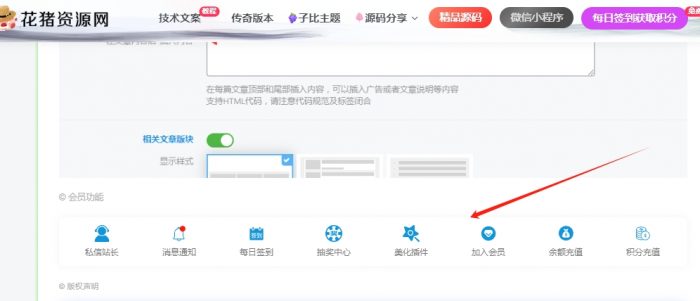
图片教程
![图片[2]- 子比主题首页时间代码分享](https://www.dh139.cn/wp-content/uploads/2026/01/1-2.jpg)
![图片[3]- 子比主题首页时间代码分享](https://www.dh139.cn/wp-content/uploads/2026/01/2-2-1024x646.jpg)
© 版权声明








声明
花猪使用须知
- 1本网站内容仅供个人学习、研究和欣赏,未经授权禁止用于任何商业用途。
- 2网站中的代码示例仅用于教育目的,使用时请遵循相关开源协议和授权规定。
- 3转载或引用本站内容请注明出处,尊重原创,共同维护良好的创作环境。
- 4网站评论区欢迎理性讨论,请勿发表违反法律法规的言论,共建和谐社区。
- 5如有内容侵犯您的权益,请通过博客联系方式告知,将立即核实并处理。
- 6使用本站资源时产生的任何问题与后果需自行承担,请谨慎操作。
THE END
喜欢就支持一下吧
![[翎风引擎]独家天刀沉默II代新天命玩法专属单职业版-武学系统-强大后台-自动回收- 花猪资源网](https://www.dh139.cn/wp-content/uploads/2025/12/1-651x500.jpg)


相关推荐



搜索
购买邀请码-加入会员

最新评论
![表情[aoman]- 花猪资源网](https://www.dh139.cn/wp-content/themes/zibll/img/smilies/aoman.gif)











暂无评论内容