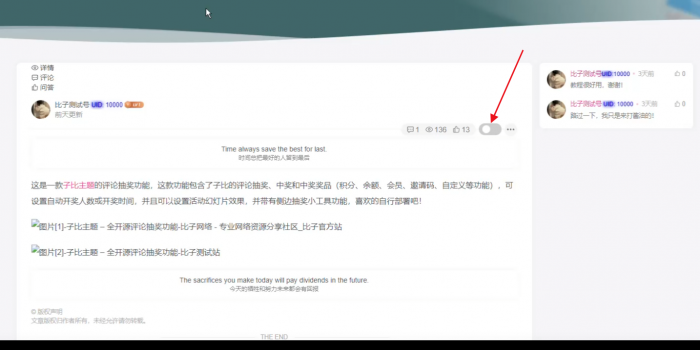



![图片[1]- 子比主题文章页隐藏侧边栏按钮](https://www.dh139.cn/wp-content/uploads/2025/12/12-12-1024x513.png)
![图片[2]- 子比主题文章页隐藏侧边栏按钮](https://www.dh139.cn/wp-content/uploads/2025/12/13-3-1024x480.png)
安装有点点复杂,嫌麻烦的可以装别人刚刚发的。
教程开始
在文章页/inc/functions/zib-single.php大概在367行插入下方代码,看图
![图片[3]- 子比主题文章页隐藏侧边栏按钮](https://www.dh139.cn/wp-content/uploads/2025/12/12-10-1024x524.jpg)
<div class=”clearfix ml6″>
<label class=”toggle-switch” data-tooltip=”点击关闭侧边栏”>
<input type=”checkbox” id=”toggle-sidebar”>
<span class=”slider”></span></label>
<style>.toggle-switch{position:relative;display:inline-block;width:46px;height:24px;top:5px}.toggle-switch[data-tooltip]:before{content:attr(data-tooltip);position:absolute;bottom:100%;left:50%;transform:translateX(-50%);padding:5px 10px;background-color:#6345eb;color:#fff;border-radius:4px;font-size:12px;white-space:nowrap;opacity:0;visibility:hidden;transition:opacity .3s;margin-bottom:5px}.toggle-switch:hover[data-tooltip]:before{opacity:1;visibility:visible}@media (max-width:768px){.toggle-switch{display:none}}.toggle-switch input[type=checkbox]{position:absolute !important;opacity:0 !important;width:0 !important;height:0 !important;background:0 0 !important;border:none !important;box-shadow:none !important}.toggle-switch input[type=checkbox]:checked{background:0 0 !important;border:none !important;box-shadow:none !important}.toggle-switch .slider{position:absolute;cursor:pointer;top:0;left:0;right:0;bottom:0;background-color:#ccc;transition:.4s;border-radius:22px}.toggle-switch .slider:before{position:absolute;content:””;height:16px;width:16px;left:7px;bottom:4px;background-color:#fff;transition:.4s;border-radius:50%}.toggle-switch input[type=checkbox]:checked+.slider{background-color:var(–focus-color) !important}.toggle-switch input[type=checkbox]:checked+.slider:before{transform:translateX(18px)}</style></div>
在后台自定义JS插入下方代码
<script>$(document).ready(function(){$(document).ajaxComplete(function(event,xhr,settings){$(‘.modal-dialog’).each(function(){if($(this).find(‘.modal-close-text’).length===0){var reminder=$(‘<span class=”modal-close-text” style=”position: absolute;bottom: -35px;z-index: 99;left: 0;right: 0;text-align: center;color: #efefef;user-select: none;pointer-events: none;”>点击任意地方关闭</span>’);$(this).prepend(reminder);}});});$(document).on(‘hidden.bs.modal’,’.modal’,function(){$(this).find(‘.modal-close-text’).remove();});});</script>
<script>jQuery(document).ready(function($){const toggleBtn=$(‘#toggle-sidebar’);const toggleLabel=$(‘.toggle-switch’);const sidebar=$(‘.sidebar’);const contentLayout=$(‘.content-layout’);if(localStorage.getItem(‘sidebarHidden’)===null){localStorage.setItem(‘sidebarHidden’,’false’);}
function updateTooltip(isHidden){toggleLabel.attr(‘data-tooltip’,isHidden?’点击展开侧边栏’:’点击关闭侧边栏’);}
function initSidebarState(){const isHidden=localStorage.getItem(‘sidebarHidden’)===’true’;toggleBtn.prop(‘checked’,isHidden);if(isHidden){sidebar.hide();contentLayout.css({‘width’:’100%’,’flex’:’0 0 100%’,’max-width’:’100%’});}else{sidebar.show();contentLayout.css({‘width’:”,’flex’:”,’max-width’:”});}updateTooltip(isHidden);}initSidebarState();toggleBtn.on(‘change’,function(){const isChecked=$(this).is(‘:checked’);if(isChecked){sidebar.hide();contentLayout.css({‘width’:’100%’,’flex’:’0 0 100%’,’max-width’:’100%’});localStorage.setItem(‘sidebarHidden’,’true’);}else{sidebar.show();contentLayout.css({‘width’:”,’flex’:”,’max-width’:”});localStorage.setItem(‘sidebarHidden’,’false’);}updateTooltip(isChecked);});});</script>
教程二
代码放在 inc/functions/functions.php 最下面
© 版权声明








声明
花猪使用须知
- 1本网站内容仅供个人学习、研究和欣赏,未经授权禁止用于任何商业用途。
- 2网站中的代码示例仅用于教育目的,使用时请遵循相关开源协议和授权规定。
- 3转载或引用本站内容请注明出处,尊重原创,共同维护良好的创作环境。
- 4网站评论区欢迎理性讨论,请勿发表违反法律法规的言论,共建和谐社区。
- 5如有内容侵犯您的权益,请通过博客联系方式告知,将立即核实并处理。
- 6使用本站资源时产生的任何问题与后果需自行承担,请谨慎操作。
THE END
喜欢就支持一下吧
![[翎风引擎]独家天刀沉默II代新天命玩法专属单职业版-武学系统-强大后台-自动回收- 花猪资源网](https://www.dh139.cn/wp-content/uploads/2025/12/1-651x500.jpg)


相关推荐



搜索
购买邀请码-加入会员

最新评论
![表情[aoman]- 花猪资源网](https://www.dh139.cn/wp-content/themes/zibll/img/smilies/aoman.gif)











暂无评论内容