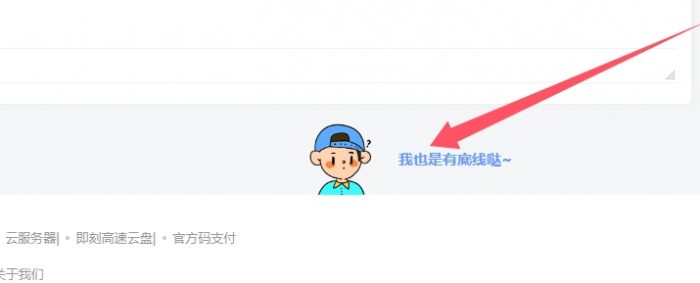



![图片[1]- 子比主题底部添加底线图片](https://www.dh139.cn/wp-content/uploads/2025/04/3-22.jpg)
下面代码放入主题自定义CSS
/*底部可爱底线提示*/.lastpagenotice_noticewrap{color:hsla(0, 2.1%, 18.8%, 0.6);}.lastpagenotice_noticewrap img{height:73px; width:88px; margin:0 auto}.lastpagenotice_noticewrap .lastpagenotice_text{display:block; position:absolute; font-size:15px; line-height:20px; top:50%; -webkit-transform:translateY(-50%); -ms-transform:translateY(-50%); transform:translateY(-50%); left:-webkit-calc(50% + 60px); left:calc(50% + 60px)}.lastpagenotice_noticewrap .lastpagenotice_line{width:100%; height:1px; background-color:hsla(0,0%,100%,.05); position:absolute; bottom:0}.app_normal{text-align:center; position:relative}下面代码放入 子比根目录文件footer.php内 footer标签前面
<!--底部可爱底线提示-->
<div class="app_normal window" style="padding-top:" data-reactroot=""><div class="common_container lastpagenotice_noticewrap"><img src="https://www.mduge.com/lan.png" data-spm-anchor-id="a2ha1.14919748_WEBHOME_GRAY.0.i1"><div class="lastpagenotice_text"  style="color:#6699FF;font-weight:bold;">我也是有底线哒~</div><div class="lastpagenotice_line"></div></div></div>
© 版权声明








声明
花猪使用须知
- 1本网站内容仅供个人学习、研究和欣赏,未经授权禁止用于任何商业用途。
- 2网站中的代码示例仅用于教育目的,使用时请遵循相关开源协议和授权规定。
- 3转载或引用本站内容请注明出处,尊重原创,共同维护良好的创作环境。
- 4网站评论区欢迎理性讨论,请勿发表违反法律法规的言论,共建和谐社区。
- 5如有内容侵犯您的权益,请通过博客联系方式告知,将立即核实并处理。
- 6使用本站资源时产生的任何问题与后果需自行承担,请谨慎操作。
THE END
喜欢就支持一下吧
![[翎风引擎]独家天刀沉默II代新天命玩法专属单职业版-武学系统-强大后台-自动回收- 花猪资源网](https://www.dh139.cn/wp-content/uploads/2025/12/1-651x500.jpg)


相关推荐



搜索
购买邀请码-加入会员

最新评论
![表情[aoman]- 花猪资源网](https://www.dh139.cn/wp-content/themes/zibll/img/smilies/aoman.gif)











暂无评论内容